
As buildings become more connected, vehicle access is the next step in creating a seamless user experience. Learn how License Plate Recognition makes it possible.
Vehicle access is often managed separately from the rest of a building's access control system, relying on remotes, cards, or manual processes that create unnecessary complexity for administrators and users alike. Powered by AVUTEC's ANPR camera technology, License Plate Recognition enables authorized vehicles to enter automatically, extending access management beyond doors and into parking barriers.
Bridging cloud access innovation and license plate recognition for perimeter security.
Salto KS continues to expand its cloud-based access solution offering with the introduction of License Plate Recognition (LPR), now available as part of the Salto KS Pro subscription. This feature enables license plates to function as secure credentials, delivering a seamless, automated experience for vehicle access.
Built through integration with AVUTEC’s ANPR (Automatic Number Plate Recognition) cameras, LPR extends Salto KS from door access to parking, creating a fully connected smart building experience.
Now available to Salto KS users with a Pro subscription plan, this feature can transform your site's access capabilities, enabling you to efficiently manage vehicular movement and significantly improve the safety and organization of your surroundings.
Read ahead to learn more about how License Plate Recognition works in Salto KS, and what is required to equip your site with this feature.
What is License Plate Recognition in Salto KS?
License Plate Recognition in Salto KS allows a vehicle’s license plate number to act as an access credential, similar to tags, Digital Keys, or PINs. When an authorized vehicle approaches a parking barrier, the system automatically recognizes the plate and grants access without any user or lock interaction.
This enables a frictionless, fully digital experience where barriers open automatically as soon as a valid license plate is detected, improving convenience and eliminating the need for physical credentials or manual entry.
Powered by AVUTEC’s ANPR camera technology, this feature is available to Salto KS Pro users who can equip their vehicle access point with AVUTEC ANPR cameras.
How does License Plate Recognition work?
The License Plate Recognition workflow in Salto KS is simple and highly automated.
License Plate Recognition in Salto KS relies on three main components:
- The Salto KS cloud-based access control platform.
- AVUTEC ANPR cameras.
- Salto BlueConn solution, which enables secure communication between the camera and Salto KS.
In addition, each parking barrier must be configured as a lock within Salto KS using a BLUEnet Door Controller (CU), a Wall Reader, and a Salto IQ connection. Each AVUTEC camera is linked to a single barrier (Lock ID), ensuring precise access control.
Together, these components enable license plate data to be recognized and validated in the Salto KS platform, automatically triggering access.
When a car approaches a parking barrier:
- An AVUTEC ANPR camera detects and reads the license plate.
- The camera sends the license plate number and barrier Lock ID.
- Salto KS verifies whether the license plate is assigned to a user with access rights.
- If authorized, the barrier opens automatically. If not, access is denied.
This process happens within seconds, delivering a hands-free experience similar to modern License Plate Recognition solutions offered across the industry, where license plates are used as credentials to trigger automated entry.
Managing license plates as credentials in Salto KS
License plates are treated as standard credentials in Salto KS. This means:
- They can be assigned to users via the Salto KS Web App (during user creation or later via the Keys tab).
- They follow the same access logic as other credentials, based on access groups and permissions.
- Each license plate is unique and can only be assigned to one user.
- A user can have multiple license plates if they use more than one vehicle.
This unified approach ensures that all access credentials are centrally managed in a single platform.
Assigning license plates as credentials in Salto KS
License plate numbers can be assigned as access credentials in the Salto KS web application by users with the Site Admin role. There are two possible ways to assign a license plate: during user creation and from the user’s profile.
During user creation
- Go to Users, and then select Add users
- If you select Manually, follow the steps until you arrive at the Role & Rights step
- Here, select License Plate Recognition as a way of opening
- Enter the license plate number
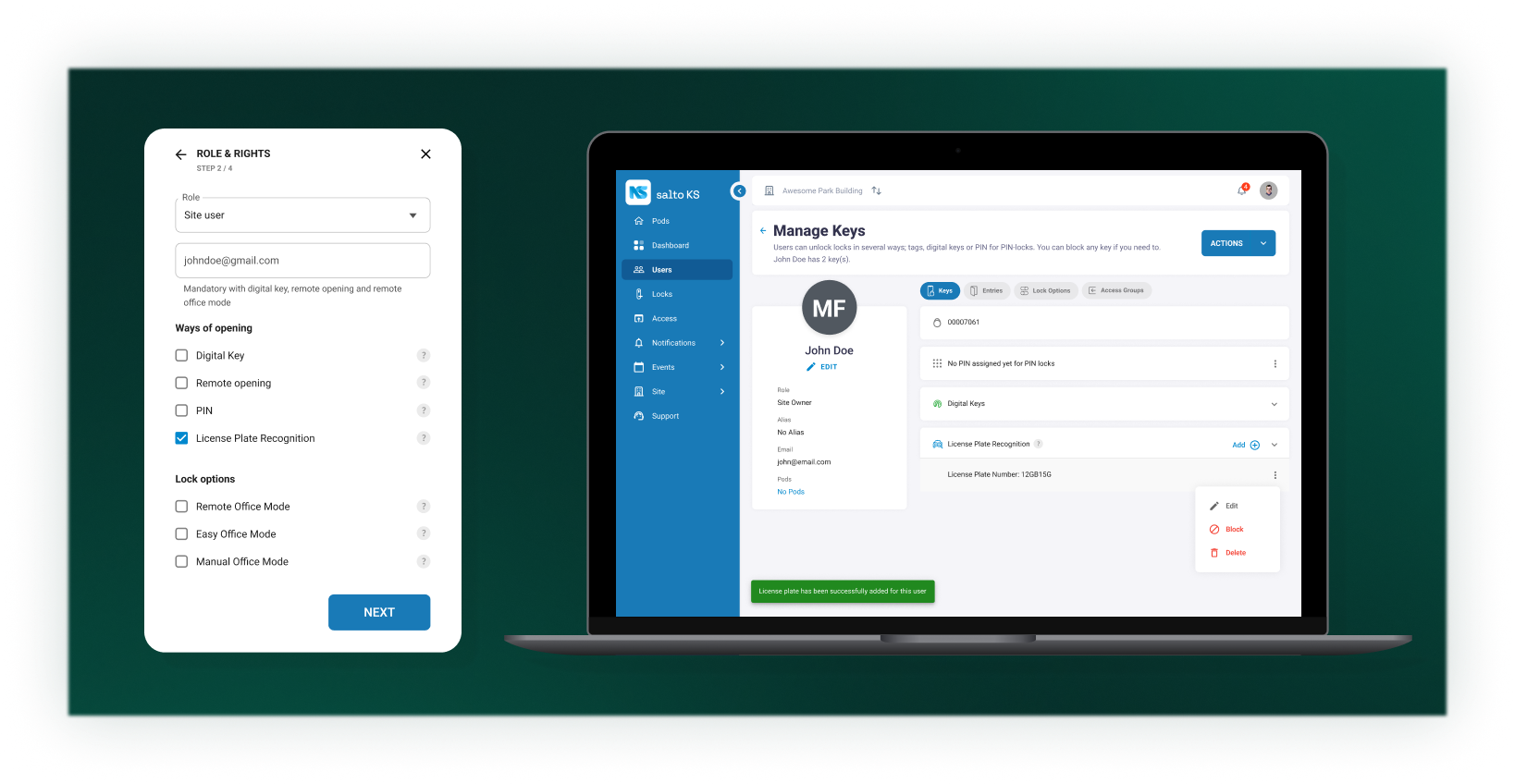
From the user’s profile
- Select a user
- Go to the Keys tab
- Click Add + next to License Plate Recognition
- Enter the license plate number
When entering the license plate number, keep in mind that it should not contain any spaces or special characters.
The key benefits of License Plate Recognition
By automating vehicle identification, LPR technology has revolutionized how we manage and control vehicular movement, significantly enhancing traffic flow and security on a site. The following are the key benefits of incorporating this feature in your site:
- Frictionless access: Drivers don’t need to present a badge, open an app, or enter a code as access is fully automatic.
- Improved user experience: Ideal for multiple industries, including residential, hospitality, and workspaces, LPR enhances arrival experiences and reduces congestion at entry points.
- Operational efficiency: Automating vehicle access reduces administrative overhead and eliminates the need for parking remotes or cards.
- Centralized credential management: License plates are managed alongside other credentials in Salto KS, simplifying administration.
Leveraging AVUTEC’s trusted ANPR Technology
The License Plate Recognition feature is powered by AVUTEC’s intelligent ANPR cameras, which combine advanced imaging, AI-based recognition, and edge processing. These cameras capture and process license plate data in real time and seamlessly integrate with third-party systems, such as Salto KS.
AVUTEC cameras should be installed a few meters from the barrier, facing approaching vehicles, typically within a 2–5 meter range for optimal accuracy.
Each camera is connected to a single barrier and requires internet connectivity, ideally via Power over Ethernet (PoE), to communicate with the Salto KS platform.
For more information on AVUTEC, click here.

Licensing and availability to Salto KS Pro sites
License Plate Recognition is included by default in all Salto KS Pro subscriptions, with one license plate per user and the option to add more. Additional license plates can be added if required.
Availability may vary depending on AVUTEC camera coverage in your region; please check with AVUTEC or your local Salto team for details.
While Salto KS provides the integration and credential management, AVUTEC is responsible for camera hardware, licensing, and service levels. Customers should refer directly to AVUTEC or their local partners for:
- Camera licenses and subscriptions
- Installation and configuration support
- SLA and service-related inquiries
Enhance your access management with vehicle access
License Plate Recognition in Salto KS Pro represents a natural evolution in access control, extending secure, digital credential management from doors to vehicles.
Similar to other Salto KS credentials, LPR even provides Offline Access, allowing it to continue operating even during connectivity interruptions. AVUTEC cameras periodically store a local list of authorized license plates (valid for up to 24 hours), enabling offline access decisions and ensuring continuous, uninterrupted operation and car access management.
For more information on this feature and how it works, explore the FAQs on the Salto Support Portal here.
By leveraging this feature that combines Salto KS with AVUTEC’s ANPR expertise, organizations can deliver faster, more convenient, and highly automated access experiences for modern buildings.
Discover how Salto's smart access solutions can help modernize your organization's security.
